
Size charts · Popups · Product tabs for BigCommerce
Set up once.
Apply automatically.
Stop editing product pages one by one. Create reusable size charts, popups and product tabs, then let PRIKID.APP apply them automatically to matching products.
Target by brand, category, product name or title keywords. Products you add later are covered automatically when they match the saved rules.
Free for 2 active content items.
Create unlimited items. Upgrade when you need more published content.
Size guide · Storefront example

Merchant examples
Used by BigCommerce merchants across apparel, healthcare and specialty retail.

Compression Health

Medical Uniforms NZ

Devon Clothing
Schoolwear & uniforms

Ultralight Outdoor Gear
Outdoor clothing & equipment
Less repetitive work
Manage once. Reuse across your catalog.
Keep information consistent across your catalog without pasting the same chart or instructions into every product.
01 / Apply
Reach the right products
Choose products by category, brand, name or title keywords. Combine conditions with AND / OR rules to control which products receive each item.
02 / Update
Make one change
Edit a shared chart, guide or tab centrally. Every product assigned to that content uses the updated version.
03 / Grow
Keep new products covered
Add products to your BigCommerce catalog as usual. When they match an existing rule, PRIKID applies the relevant content automatically.
More than a size-chart app
Size guides, product tabs and popups—right where shoppers need them
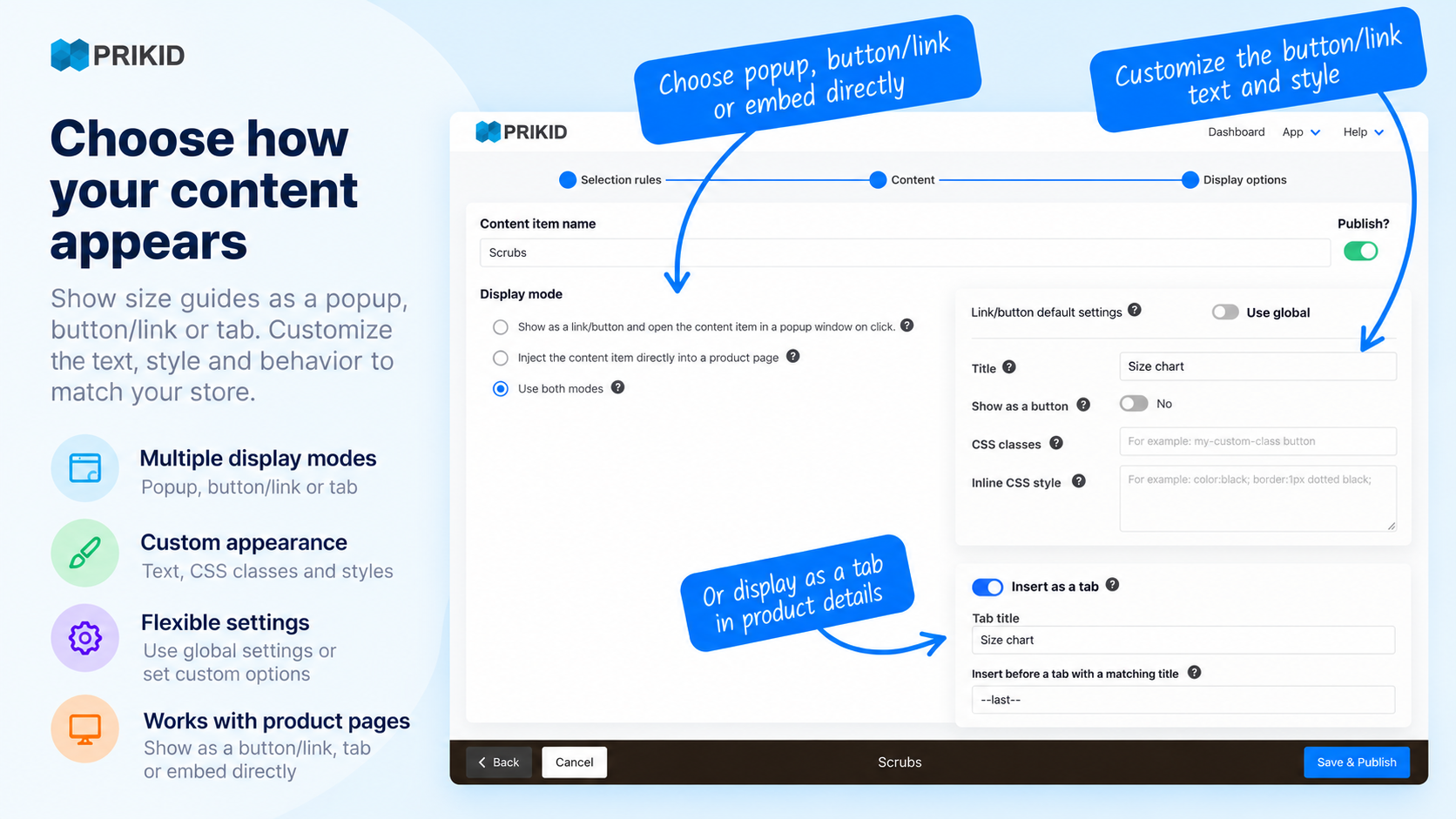
Turn repeated questions into reusable product content. Show a size guide in a popup, add specifications in a tab, or place instructions directly on the page. Explore our BigCommerce Size Chart App to see how reusable size guides work.
- Size charts: measurements, fit notes and how-to-measure guides.
- Product tabs: specifications, materials, care and warranty details.
- Popups: delivery notes, product notices and other information shoppers need.
Choose the display format that suits your content and storefront. Automatic tab placement depends on your theme; custom placement may require a theme edit or help from support.

Flexible product targeting
Target by brand, category, product name and more
Different brands and product categories need different information. Set up a separate content item for each guide, then use rules to select the products it belongs to.
Combine brand, category and product-name conditions. Preview the matching products before you publish the item in PRIKID.
For example: choose products in your women’s T-shirts category whose name contains “T-Shirt”. Attach the shared chart once; future matching T-shirts receive it too.
Build rich content
Build size guides with tables, images and Google Sheets
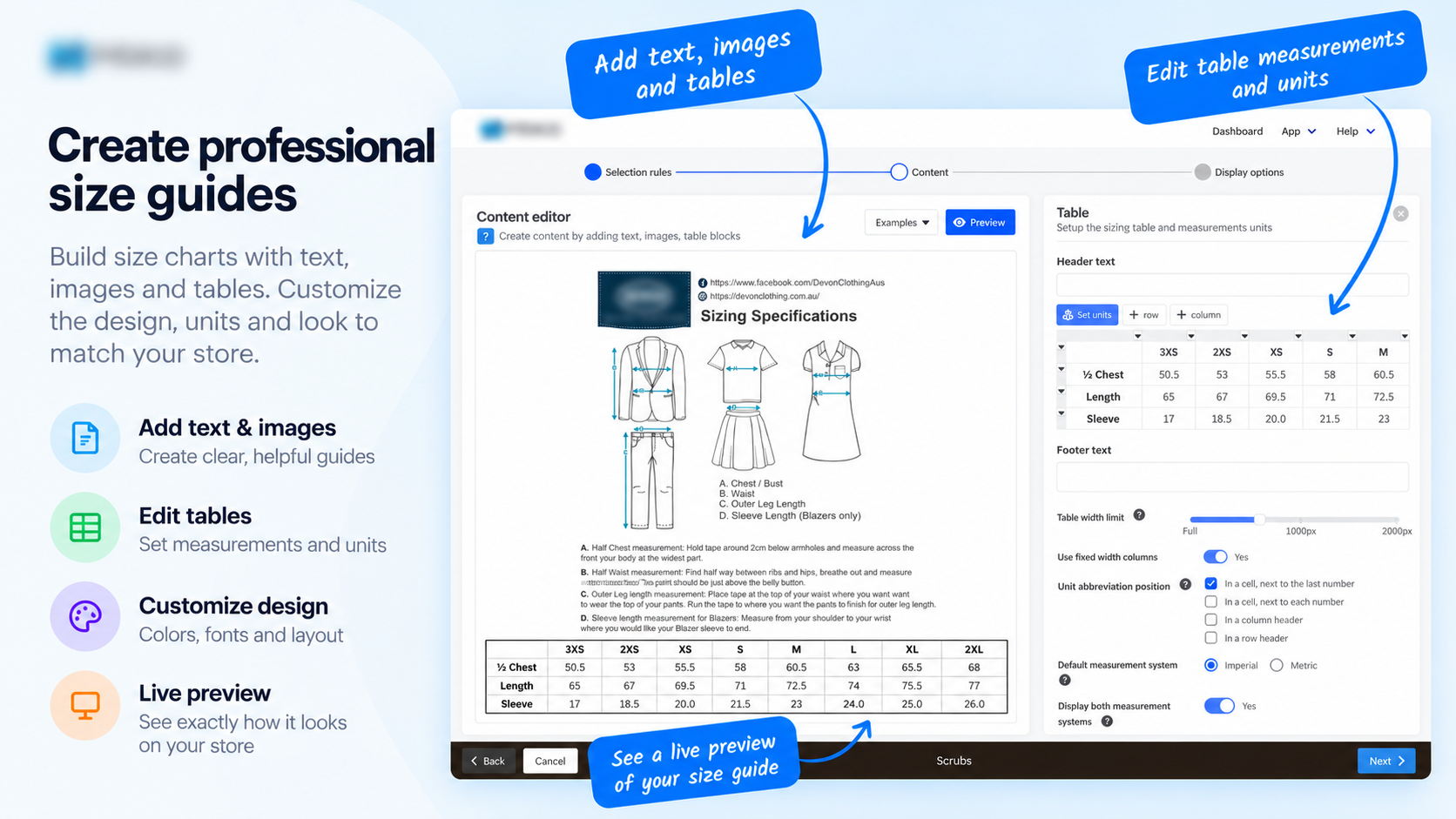
Use the visual editor to combine formatted text, images, video and tables. Copy an existing table or import the first sheet of a Google spreadsheet published to the web. Refresh the Google Sheets block in PRIKID after spreadsheet edits.
- Add measurement instructions alongside the chart.
- Support metric and imperial measurements in size tables.
- Reuse specifications, care advice and shipping information.
From setup to storefront
Three steps. One reusable workflow.
Start with a single chart or tab, check it on your store, then use the same approach across your catalog.
Step 1
Choose the products
Create a content item and define its product-selection rules. Check that the preview includes the products you intended.
Step 2
Build the content
Add your chart, instructions or product information. Choose a size-chart popup, general popup, tab or inline placement.
Step 3
Publish in PRIKID
Publish the item, then check it on your storefront. Future edits are made once in PRIKID and reused everywhere the item is assigned.
Merchant feedback
What BigCommerce merchants say
Read what BigCommerce merchants say about using PRIKID in their stores.
Easy To Use
“I love how easy it is to customize and add it to my store.”
BigCommerce merchant review
I love this App
“The size charts look very professional.”
BigCommerce merchant review
Simple pricing
Start free. Grow when you’re ready.
A content item can appear on multiple matching products. The Free plan’s limit is active content items, rather than two product pages.
Free
For your first charts and tabs
$0 / month
- Create unlimited content items
- Publish up to 2 items at the same time
- Size charts, popups and product tabs
- Flexible targeting and central updates
Premium
For a catalog with more content
$20 / month
Or $150/year — $12.50/month billed annually.
- Create and publish unlimited content items
- Use every app feature without restrictions
- Full support
Before you install
Your questions, answered
What counts as an active content item?
A published size chart, popup or product tab is a content item. One item can be assigned to many matching products. Free lets you create unlimited items and publish up to two at a time; Premium removes that published-item limit.
Will the content apply to products I add later?
Yes. When a new product matches your saved selection rules, PRIKID applies the relevant content automatically. You can also update the shared content from one place.
Can I use it for more than apparel size charts?
Yes. Use product tabs and popups for specifications, care instructions, warranty details or other product information. Size tables can also be useful for items such as art prints or equipment.
Can shoppers switch between metric and imperial units?
PRIKID size tables support conversion between metric and imperial measurements, so shoppers can view the chart in the measurement system they use.
Does PRIKID support multi-storefront or headless stores?
PRIKID does not natively support multi-storefront or headless storefronts. Standard installation normally works on the main storefront. Contact support before installing on a custom setup so the integration requirements can be checked.
Where can I get setup help?
Follow the documentation for guides and examples, or open a support ticket with your store URL and the details of your question.
Build your first reusable item
Better product information.
Less catalog maintenance.
Start with a size chart, popup or tab. Set the rules once, and let PRIKID handle matching products.
Free for up to 2 active items. Upgrade when your store needs more.