
BigCommerce size chart app
Create one size chart.
Apply it automatically.
Stop adding the same sizing information to product pages one by one. Build a reusable size chart in PRIKID.APP, define which BigCommerce products it belongs to, and keep future matching products covered by the same rules.
Use brand, category, product-name and other product-selection conditions to control where each guide appears. Update the chart once in PRIKID instead of maintaining copies across your catalog.
Free for up to 2 active content items. One active chart can be shown on many matching products.
Storefront example

A reusable PRIKID size guide displayed on a BigCommerce product page.
Less catalog maintenance
Manage the chart, not hundreds of copies
PRIKID separates the size guide from individual product descriptions. Create shared content once, choose the products it belongs to, and maintain it centrally.
Create a reusable size chart
Build the measurements, fit notes and instructions once using tables, text, images and other editor blocks.
Choose matching products
Use product-selection rules such as brand, category and product-name conditions instead of manually editing every product page.
Keep the catalog covered
When newly added products match the saved rules, the same reusable content can apply to them automatically.

Product-selection rules let one guide cover the products that actually need it.
Rule-based targeting
Show the right chart on the right products
A large catalog rarely uses one universal size chart. Create separate guides for different brands or product groups, then define the conditions that decide where each guide appears.
- Target products by category, brand and product-name criteria.
- Combine conditions when a guide should apply only to a narrower group.
- Preview matching products before publishing.
- Change one shared chart later without editing each matched product.
If a rule matches zero products: check that the selected product field actually contains the value you are targeting, then use Preview to check the resulting product set.
A practical example
One chart can cover a whole product group
Instead of assigning a chart product by product, use rules that describe the group it belongs to.
Result: the shared chart is attached to matching products, and future products that meet the same conditions can receive it without another round of manual product-page editing.
Storefront presentation
Use the display style that fits your product page
A size guide does not have to take over the product description. PRIKID can present reusable product content in different formats depending on your storefront and theme.
Size-chart popup
Let shoppers open the guide from a link or button near the product options while keeping the product page compact.
Product tab
Place sizing or specifications inside the product-page tab structure when the theme provides a compatible tab container.
Inline content
Display the guide directly in the product page where the information should stay visible without opening a popup.
Custom theme? Automatic placement depends on the structure of your BigCommerce theme. If a published chart matches the product but does not appear where expected, send support the product URL, theme name/version and desired position.
Build useful guides
Tables, instructions, images and Google Sheets
A useful size guide is often more than a row of measurements. Add explanatory text, how-to-measure instructions, images and tables, or bring in content from a Google Sheet published to the web.
- Create size tables with reusable content blocks.
- Add fit notes and measurement instructions beside the table.
- Support metric and imperial measurements in size tables.
- Use the same editor for specifications and other reusable product information.
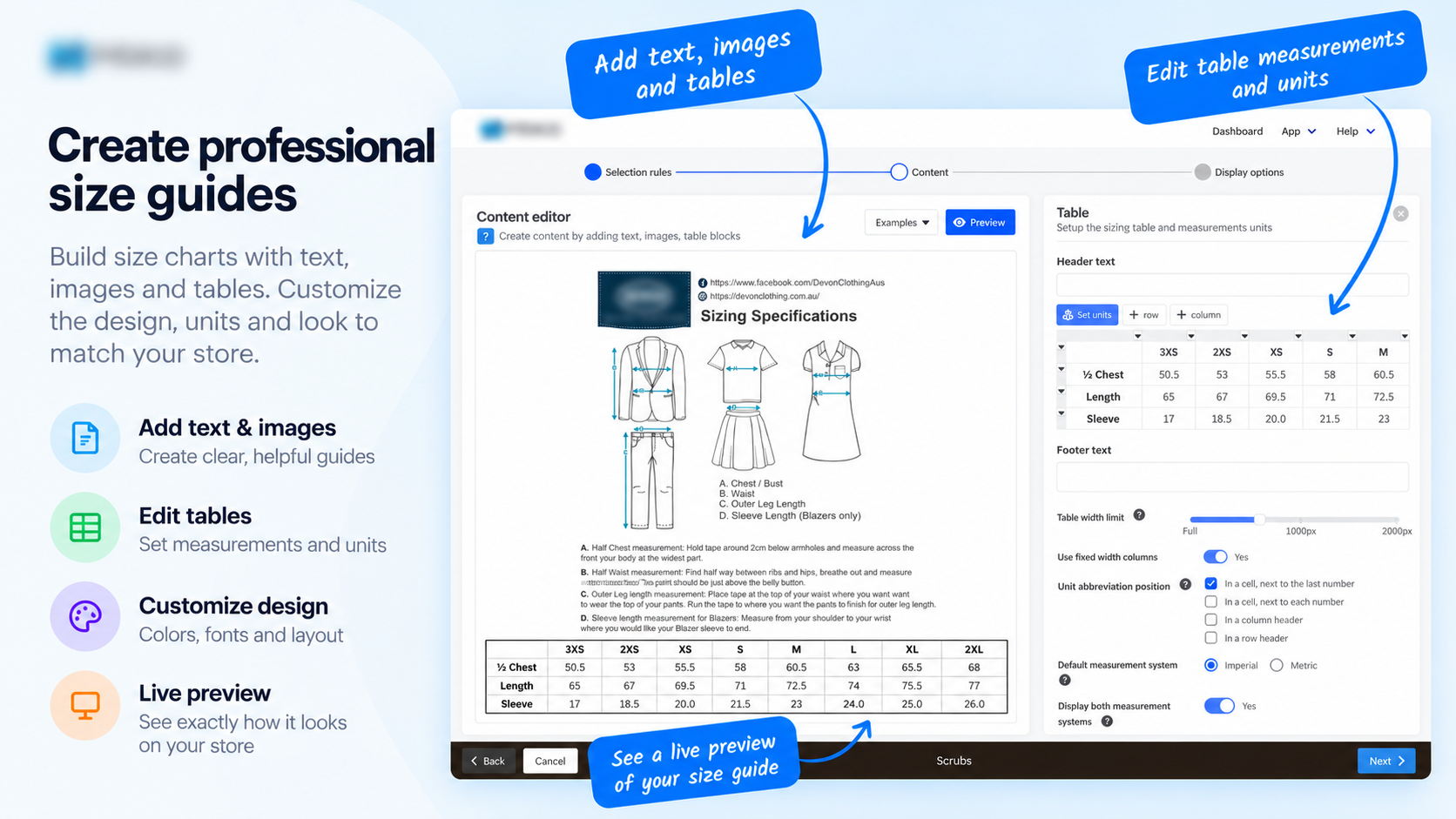
Build and maintain reusable size-guide content from one editor.
Free plan explained
Two active items does not mean two products
The Free plan lets you create unlimited content items and keep up to two active at the same time. An active size chart can be assigned to many matching products, so the limit is on published PRIKID content—not on the number of product pages it can cover. See pricing details →
Compatibility
Designed for BigCommerce product pages
PRIKID’s standard workflow is built around BigCommerce product-page content. Theme structure matters for placement, especially for tabs and heavily customized storefronts.
PRIKID does not natively support multi-storefront or headless storefronts. If you use a customized theme, secondary storefront or headless setup, contact support before relying on a specific placement or integration workflow.
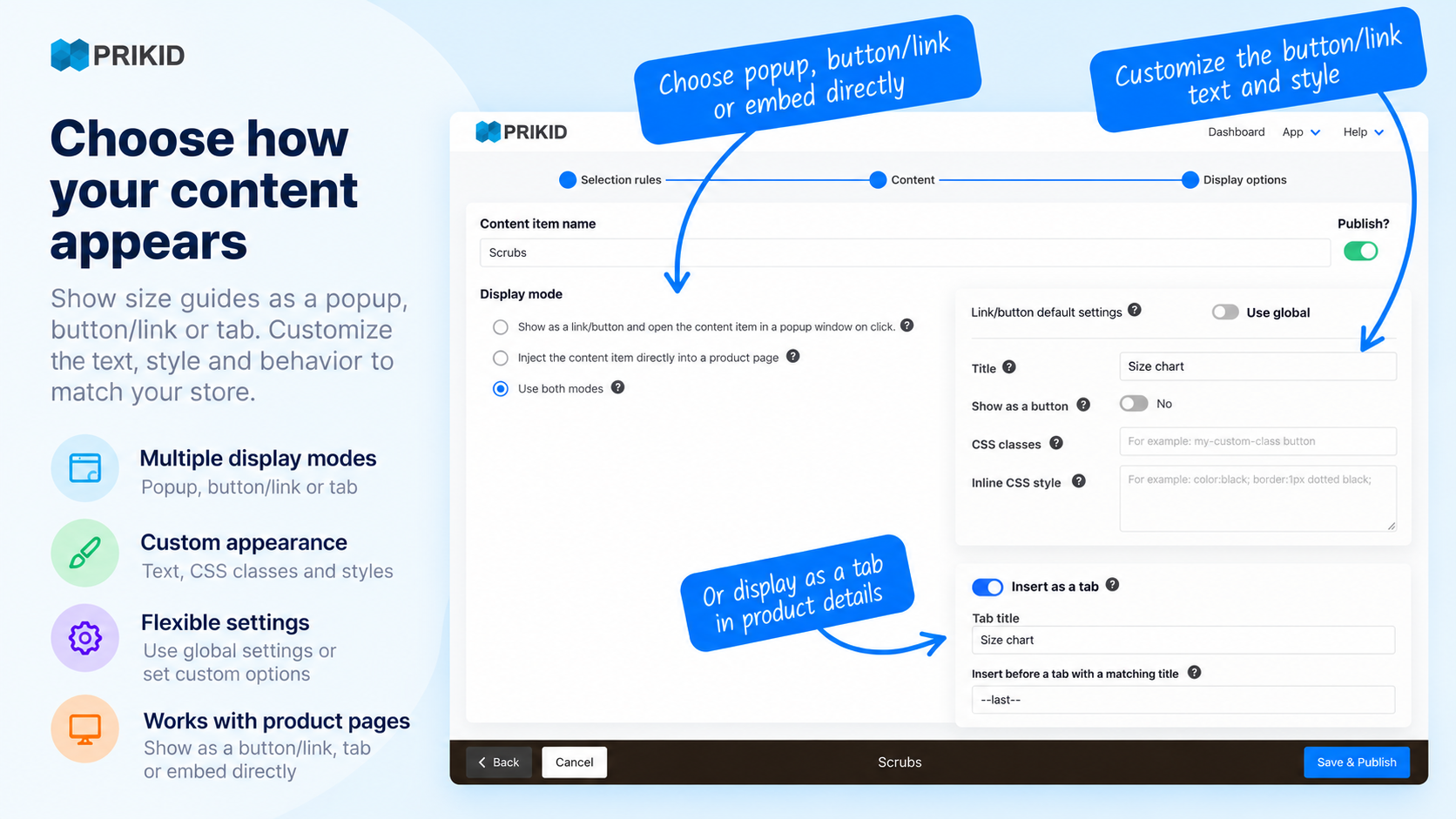
Display options depend on the content type and storefront structure.
BigCommerce size chart FAQ
Common questions before you install
How many products can one size chart cover?
A reusable chart can be assigned to many matching products. The Free plan’s two-active-item limit counts published PRIKID content items, not the number of product pages using an item.
Will a size chart apply to products I add later?
Yes, when a new product matches the saved product-selection rules for that content item. This is what lets a reusable chart continue covering a changing catalog.
Why does my condition match no products?
Check that you are targeting the field that actually contains the value you expect. Then use the product Preview in PRIKID to verify the matched set before publishing.
Can I show the guide as a popup, tab or directly on the page?
Yes. PRIKID supports popup, product-tab and inline presentation for reusable product content. Theme structure can affect automatic placement, especially for tabs and custom storefronts.
Does it work with custom BigCommerce themes?
Many stores can use the standard placement, but customized themes can require an adjustment. If content is published and matched but not visible, contact support with a product URL, theme name/version and the expected location.
Does PRIKID support multi-storefront or headless BigCommerce stores?
Not natively. Contact support before installation if your setup uses a secondary storefront, Catalyst/headless architecture or another non-standard storefront configuration.
Start with one reusable chart
Spend less time maintaining size charts product by product
Create the guide once, define the matching rules, and let PRIKID reuse it across the catalog.
Free for up to 2 active content items. Upgrade when you need more published content.