
BigCommerce Size Charts, Popups & Tabs
Set Up Once. Apply Automatically.
Create a size chart, popup or product tab once. Automatically show it on matching BigCommerce products—including new products added later.
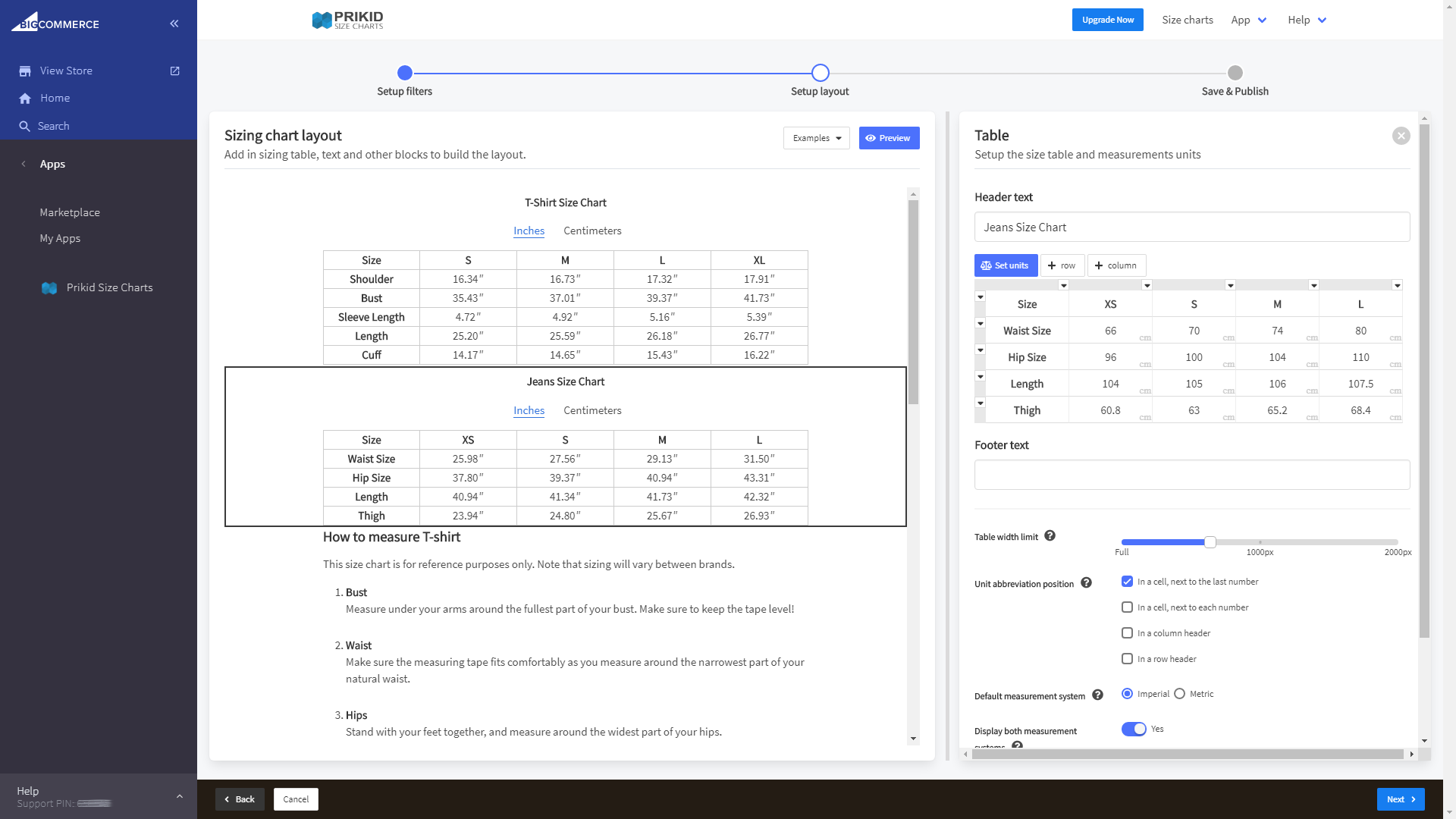
Create once. Automatically display on every matching product.
Stop editing product pages one by one. Set targeting rules by brand, category, product name or title keywords and PRIKID.APP automatically shows the right size chart, popup or tab on matching products—including products added later.
Build rich content with text, images, video, tables and Google Sheets. Make updates centrally and keep matching product pages in sync.
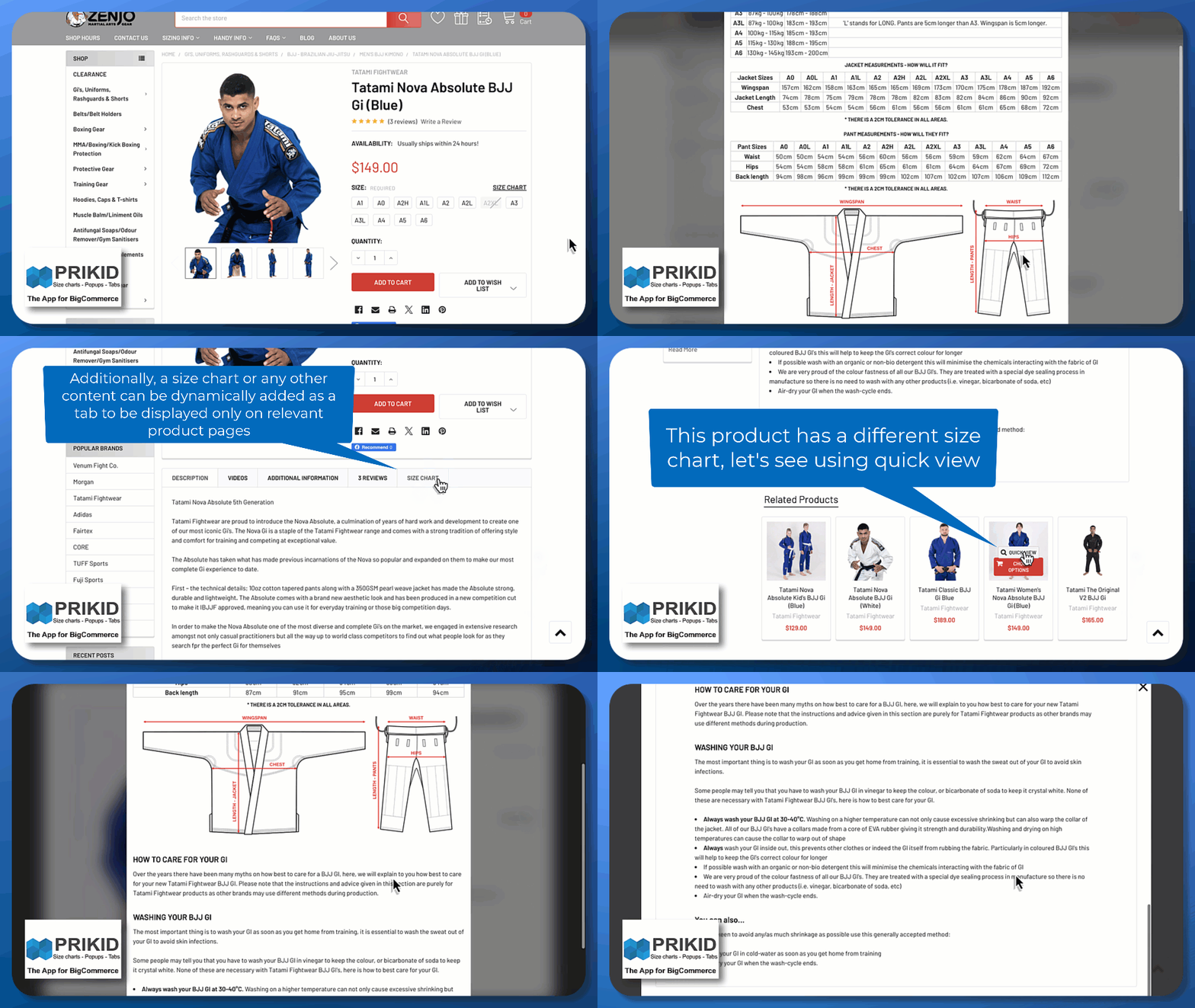
Watch PRIKID.APP in action
https://youtu.be/9_sMtWfIsZM
Create a rule once and apply the same content to every matching product. Target by brand, category, product name, title keywords or a combination of conditions. When products match the rule, PRIKID.APP displays the selected size chart, popup or tab automatically.
The app can create 2 types of pop-ups:
- General purpose pop-ups
- Dedicated pop-ups for size charts (useful for apparel stores)
You can assign multiple general-purpose pop-ups with different content to a product page, and the app can insert multiple buttons on the page to open those pop-ups. In addition, you can choose when (at which events) pop-ups should be displayed automatically.
Dedicated size chart pop-ups don’t have the ability to automatically open, but the app can automatically determine the location on the page where to place a link/button that will open a pop-up window. Usually, this place is located near the size options selector.
How PRIKID.APP works
Choose which products should show the content
Let’s say you want to place a pop-up window on all product pages that contain “T-Shirt,” which falls into the “Women’s T-Shirts” category. Just set the appropriate conditions in the rules builder as shown in the image. You can also preview a set of products to which this size chart will apply.

Build the size chart, popup or tab
The next step is to build the content of the pop-up, using different blocks.
There are text blocks where you can write a text and format it as you wish. You can use it to embed videos from the services like YouTube.
Use image blocks to upload your images and embed them into the content.
For size chart pop-ups most useful block is a table block, which supports automatic unit conversion from metric to imperial system and vice versa. In this table block, you can edit your size chart very similar to how you do it in spreadsheets like Excel or Google Spreadsheets. If you already have a size chart you can simply copy/paste it here.
In addition, by using the Google Spreadsheet block you can prepare content in the Google Spreadsheets and import it to the editor.

Publish once and keep it in sync
The next step is to set up a pop-up window and publish it.
No additional configuration is required for pop-ups of the size chart type.
But for general-purpose pop-ups, you need to specify when to show the pop-up automatically, and if you want to insert buttons into the content, you also need to add them in this step.
Then save and publish.
Now pop-ups and buttons will be automatically inserted on each product page that meets the specific selection rules you set in the first step.


Simple pricing that grows with your store
Start with the Free plan and upgrade when you need more active content. Choose monthly or annual billing.
Free — $0: Create unlimited content items and publish up to two at the same time.
Premium — $20/month, or $150/year ($12.50/month billed annually): Publish unlimited content and use every app feature.
FREE
$
0
00
per month
- Flexible product targeting rules
- Automatic links and buttons on product pages
- Visual content editor
- Automatic unit conversion in size charts
- 2 active content items
PREMIUM
$
12
50
per month, billed yearly
- Flexible product targeting rules
- Automatic links and buttons on product pages
- Visual content editor
- Automatic unit conversion in size charts
- Unlimited active content items
Used by BigCommerce stores around the world
Several hundred BigCommerce stores are currently using the PRIKID app. Here are some of them:

Compression Health

Devon Clothing

Motorcycle Closeouts By Rider Approved LLC

MotoMummy

BTR – BEYOND THE RACK
Lavington Designs LLC

Ultralight Outdoor Gear

Medical Uniforms NZ
Looking for the latest Mega Millions winning numbers ? Visit LotteryCoast.com to check the most recent drawing results, track jackpot updates, and explore all lottery information in one place. Stay updated with accurate Mega Millions results and never miss a winning opportunity.
What BigCommerce merchants say
Here are some reviews from real PRIKID.APP customers. Older reviews are shown as originally published and may mention historical pricing that is no longer current.
5/5
Fantastic App
I have been looking for a ‘size-guide’ app for a long time, to the point of pricing up development of such an app. I no longer need to as I have found an amazing offering. Hats off to the developers for this one, it is fantastic.
May, 24 2023
5/5
Easy To Use
I’ve been using the size chart feature for quite awhile and I love how easy it is to customize and add it to my store. My theme comes with a built-in size chart but I feel Prikid is easier to use. I highly recommend it.
March, 18 2023
5/5
Better than expected
For a basic popup message, this app work awesome! Because buyers never seem to read the important information about a product, we have this setup to pop up a message to grab the buyer attention. Super easy and intuitive to use. Love it!
March, 4 2023
5/5
Easy to Use
We got this app to replace Kiwi after it was removed from the app store. It’s very easy to use and integrate into BC. We customized the CSS to get the look and feel we wanted. Then we added handlebar logic to the theme to display golf club spec sheets. Highly recommend if you are looking to add size charts and/or extra content to your product pages.
January, 9 2023
5/5
Easy to create and integrate
I use this app for its size chart feature. I use it to show the different sizes that are available for my fine art prints, as well as a conversion table to toggle between metric and imperial measurements. It works beautifully!
October, 16 2022
5/5
I love this App
This a real nice app. The size charts look very professional.
February, 1 2021
5/5
Great Chart App
This app was not only easy to install, but has great directions on how to create charts. The video on their help section and their website made it easy to figure out how to create a chart and what features to include. The free plan is great, but for our company, we needed the paid plan as we needed multiple charts. The free plan only includes two charts that can be displayed at any one time. We thought the $9 per month was a reasonable price considering all the features that are included. This app is a great time saver for not only creating size charts, but for applying them to whole categories or specific categories. It alleviates having to add charts individually to each product listing. It also creates a great looking link on the product page which enables shoppers to find it easily. The branding can also be removed easily if you have the paid plan, you just go to the tab on their app section and click settings. If you sell apparel or need measurements for your website, this is a must have app.
June, 9 2021
See all reviews
Ready to make product information easier to manage?
Add better product-page content without editing every product
Looking to explore the latest lottery results, winning strategies, and jackpot updates? Visit Lottery Coast – your trusted source for all things lottery-related! From tips on improving your odds to real-time updates on global lotteries, we’ve got you covered.
Frequently Asked Questions
General questions
-
Will it work on multi-storefront or headless stores?
PRIKID.APP does not natively support multi-storefront or headless storefronts. In a multi-storefront account, the standard installation normally works only on the main storefront.
An advanced manual integration may be possible. Before adding the following example to a live store, contact PRIKID.APP support to confirm the current script URL and requirements for your storefront:
<script async src="https://dmt83xaifx31y.cloudfront.net/public/js/prikidsizecharts.js?v=50#store=STORE_HASH" crossorigin="anonymous"></script>Replace
STORE_HASHwith the relevant BigCommerce store hash.For a headless storefront, the integration must be able to identify the current BigCommerce product ID. One possible implementation is a hidden input on the product page:
<input type="hidden" name="product_id" value="86">Headless and multi-storefront implementations require developer testing. See Display Size Charts with Custom JavaScript for the supported content-ready event.
-
Is the Prikid Size Charts App for BigCommerce free?
Yes. The Free plan lets you create as many content items as you need and keep up to two of them active and published at the same time. A content item can be assigned to multiple matching products.
If you need more than two published size charts, popups or product tabs, upgrade to the Premium plan for unlimited published content and all app features.